
Last updated: September 2026
Most engineering teams have already built some version of RAG (Retrieval-Augmented Generation) by now. Maybe it's a chatbot over the company wiki, a Slack bot that searches Confluence, or a proof of concept that worked on 50 PDFs and fell apart on 50,000.
Whatever you call it – RAG, enterprise search, knowledge retrieval, context engineering – the goal is the same. Your company's knowledge lives in documents, tickets, drives, and databases. AI can only use what it can find. RAG makes that knowledge retrievable, so every model and agent you deploy answers from your data and cites where the answer came from.
- LLMs that answer complex questions: RAG allows LLMs to tap into external knowledge bases and specific bodies of information to answer challenging questions with precision and detail.
- LLMs that generate up-to-date content: By grounding their outputs in real-world data, RAG-powered LLMs can create more factual and accurate documents, reports, and other content.
- Increase LLM response accuracy: RAG augments answer generation with real-time data that’s relevant to your industry, customers, and business – so your chatbot is less likely to hallucinate to fill in missing information.
RAG systems are one of the best uses of AI in the enterprise, and one of the hardest to get right in production. This guide covers how RAG works, which type fits which problem, and what separates a demo from a system people trust.
What is RAG?
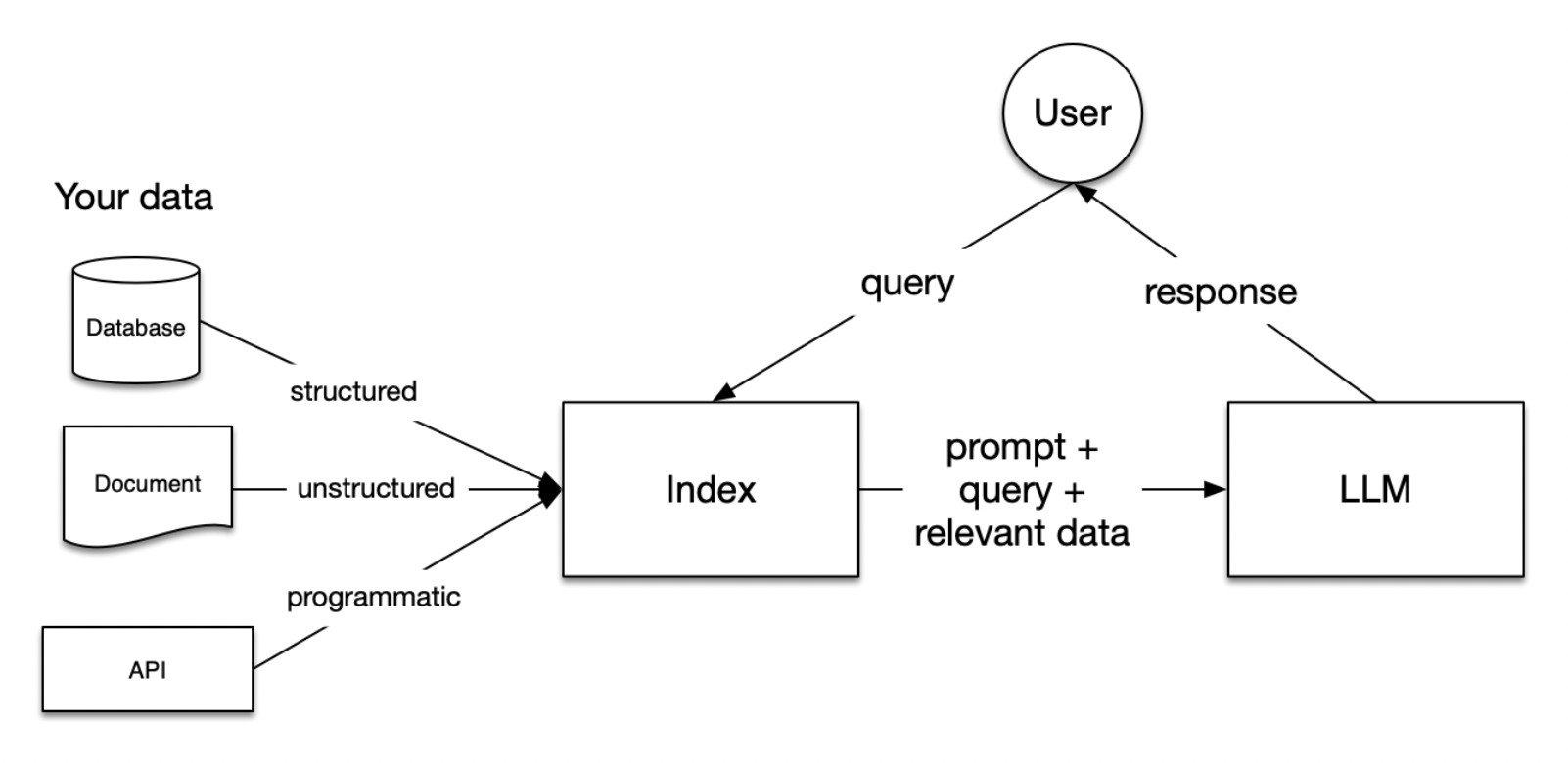
(RAG Diagram via OpenAI Cookbook)
RAG (retrieval-augmented generation) connects an LLM to data it wasn't trained on. When someone asks a question, the system finds relevant information in your data, adds it to the prompt, and the model answers from that source material instead of from memory.
Your LLMs are trained on enormous data sets, but they don’t have specific context for your business, industry, or customer. RAG adds that extra layer of information. For example, you create a RAG pipeline for your internal LLM so that employees can access a secure company or department dataset.
Here’s a simple explanation of how RAG works.
RAG has three basic steps
- Retrieval. Search your knowledge base – documents, web pages, tickets, databases, images – for the pieces of information most relevant to the question.
- Augmentation. Combine the retrieved information with the original question in a prompt the model can use.
- Generation. The LLM answers from that context and can cite the sources it used.
Together, these three steps enable the RAG model to produce responses that are more accurate, detailed, and contextually aware than what a standalone generative model could achieve.
The five stages of a RAG pipeline
We won’t go into every detail, like the original research on RAG does, but it’s helpful to break the three stages of RAG pipelines above into five different workflows.
- Loading. Import your data into the pipeline – text files, PDFs, websites, databases, and APIs. Scanned documents need OCR first, and parsing quality here caps everything downstream.
- Indexing. Split documents into chunks and build a data structure you can search. This usually means generating vector embeddings (numerical representations of your data's meaning) plus metadata like source, date, and access permissions.
- Storing. Store the index and its metadata, usually in a vector database or a search engine with vector support, so you don't have to re-index from scratch.
- Querying. Find the right chunks for each question. Methods range from simple similarity search to hybrid keyword and vector search, reranking, sub-queries, and multi-step agent workflows.
- Evaluation. Measure whether the answers are accurate, complete, and fast enough. Evaluation gives you a benchmark to compare strategies and catch regressions every time you change the pipeline.
We’re going to skip ahead and get into why RAG really matters – the business benefits and use cases.
Choose the right type of RAG
RAG has evolved far beyond simple vector search and retrieval. Multiple specialized RAG architectures have emerged, each optimized for different use cases and data types. Understanding these variations helps you choose the right approach for your specific business needs.
| RAG Type | Best for | Key strength |
|---|---|---|
| Baseline RAG | Simple Q&A, knowledge bases | Fast, straightforward |
| GraphRAG | Connected data, legal/financial | Relationship reasoning |
| Agentic RAG | Complex multi-step tasks | Autonomous adaptation |
| Multimodal RAG | Visual documents, reports | Preserves layout |
Baseline RAG
Traditional RAG uses vector similarity search to retrieve relevant text chunks from your knowledge base, converts queries and documents into embeddings, finds similar chunks, and feeds them to the LLM.
Best for: Simple question-answering and straightforward document retrieval where context is in individual text chunks.
Limitations: Baseline RAG struggles to connect the dots when answering questions requires traversing disparate pieces of information through their shared attributes. Vector-only search also misses exact terms – part numbers, contract IDs, error codes – which is why most production systems add keyword search alongside vectors (hybrid search).
GraphRAG
Microsoft released GraphRAG in mid-2024. It uses an LLM to extract entities and relationships from your documents, builds a knowledge graph, and summarizes clusters of related information so the system can answer questions about a whole dataset.
In Microsoft's paper, GraphRAG beat baseline vector RAG on answer comprehensiveness 72–83% of the time on podcast transcripts and 72–80% on news articles. Those wins came on broad "sensemaking" questions (what are the main themes across this dataset?), not simple lookups.
In a separate benchmark across finance, healthcare, industrial, and legal documents, AWS partner Lettria found GraphRAG answered 80% of questions correctly vs. 50.83% for vector-only RAG.
The trade-off is cost. Building the graph means running an LLM over your entire corpus, and the graph needs rebuilding as your data changes.
Best for: Legal research, financial analysis, investigations, and domains where the answer depends on relationships across many documents.
Agentic RAG
Agentic RAG puts AI agents in charge of retrieval. Instead of one search followed by one answer, agents use reflection, planning, tool use, and multi-agent collaboration to decide what to search, check what came back, and search again when the first results aren't enough.
That loop matters when a question can't be answered from a single retrieval: comparing two projects, checking a design against a regulation, or tracing a decision across years of documents.
A typical agentic RAG loop has four steps:
- Plan. The agent breaks the question into sub-questions and picks which sources and search methods to use.
- Retrieve. It runs searches – vector, keyword, SQL, or API calls to other systems through tools like MCP.
- Evaluate. It checks whether the results answer the question and flags gaps or conflicts.
- Repeat or answer. It searches again with a sharper query, or writes the answer with citations.
What we've learned building agentic RAG in production:
- Design workflows around question types. A single general-purpose agent has to guess what kind of question it's facing every time. Separate workflows for open-ended research, exact lookups, side-by-side comparisons, and compliance checks – all on one shared index – are easier to tune, test, and trust.
- Keep a keyword path. Agents still need exact-match search for part numbers, file names, and codes. A strong hybrid index underneath does more for answer quality than a smarter agent on top.
- Run agents in parallel for comparisons. Comparing two projects or contracts works better when one agent researches each side and a final step reconciles them.
- Cite everything. Every answer should link to the source document and its exact location, so users can check the work before they act on it.
- Budget for the loop. Each plan-retrieve-evaluate cycle adds LLM calls, latency, and cost. Cap the number of steps, and send simple lookups straight to baseline retrieval.
Managed platforms are starting to build this in. Amazon Bedrock's Managed Knowledge Base now includes agentic retrieval for multi-hop questions.
Best for: Research and analysis tasks where the system has to plan, compare, or verify – engineering, financial analysis, legal review, and compliance.
Multimodal RAG
Multimodal RAG retrieves images, tables, charts, and scanned pages alongside text. Systems like ColPali process document pages as images, capturing visual layouts, tables, figures, and fonts that text-only RAG misses.
The other route is to extract text and structure first. Scans with no text layer need OCR before anything else works – EVS used MinerU and Docling to parse its scanned archive before indexing. Images themselves can be retrieved too, like the vision RAG tool we built with LLaVA.
Best for: Financial reports, legal documents with complex formatting, engineering drawings, research papers with figures, and any document where layout carries meaning.
Most production systems combine these approaches. A hybrid index with an agent choosing the retrieval strategy is common. RAG is also becoming one part of a larger context system – memory, tools, and retrieval working together to give the model what it needs.
Now let's get into why RAG matters – the business benefits and use cases.
Business benefits of RAG
Imagine a customer service representative who needs to answer a complex question about a product. Normally, they'd have to sort through multiple documents, product listings, and customer reviews to come up with their own answer. It could take ten minutes, an hour, or until the next day to return a solid answer for the customer.
With RAG, your reps can ask the company LLM a product question and receive a complete answer sourced from product manuals, FAQs, customer reviews, sizing charts, inventory data, and other documents. This could take seconds.
Similar improvements are possible across your other internal processes and customer-facing experiences.
Enhanced accuracy and reliability
- Grounded answers. RAG gives the LLM your actual source material, so outputs reflect your data instead of the model's guesses.
- Citations you can check. Answers can link back to the exact document they came from, so users can verify before they act.
- Improved user trust. People adopt AI tools they can verify.
Increased productivity and efficiency
- Faster access to information. Users get answers without sifting through large volumes of data.
- Better decisions. Accurate, up-to-date information helps teams decide faster.
- Reduced workload. Automating knowledge-heavy tasks frees employees for higher-value work.
Better experiences and cost savings
- Lower model costs. RAG reduces the need for expensive fine-tuning because the model accesses information at query time.
- Current answers without retraining. Update the index and the next answer reflects the change.
- Better customer experience. Customers get the information they need quickly, which increases satisfaction.
What it takes to build production-ready RAG
It's easy enough to build a simple RAG pipeline from a tutorial. Production enterprise RAG is a different beast. Demos run on a few clean documents. Production runs on millions of messy ones, with real users asking questions nobody planned for.
These are the problems that decide whether a RAG system works:
- Parsing. Scanned PDFs, tables, and drawings break text extraction before retrieval ever starts. Most bad answers trace back to bad parsing.
- Retrieval quality. Start with the basics – chunking, metadata filtering, and hybrid search – before adding reranking and agents.
- Freshness. Indexing once is the quiet failure. EVS's pipeline scans for new files every 15 minutes and feeds a queue to a fleet of 0–20 tasks, with retries and a dead-letter queue so no file silently drops out.
- Evaluation. Define a benchmark before you optimize. EVS used engineer-scored answers and a scored acceptance replay – the system passed 100% of the replay, with 0 errors across a 155-node workflow replay.
- Trust. Citations and access controls decide whether people use the system. If users can't check an answer, they won't act on it.
How to choose an LLM for RAG
The model you pick matters more now that agents run retrieval. Answering from a handful of retrieved chunks is easy for most frontier models. Planning searches, calling tools, and deciding when to search again separates them. Judge models on five things:
- Faithfulness. Does it stick to the retrieved sources and cite them, or fill gaps from its own memory? Test this on your own documents.
- Tool use and planning. Agentic RAG depends on the model calling search tools reliably and knowing when it has enough to answer.
- Context window. Larger windows fit more retrieved material per call, but more context isn't always better – irrelevant chunks still dilute answers.
- Cost and latency per query. Agent loops multiply both. Many teams use a smaller model for routing and query rewriting and a frontier model for the final answer.
- Where it runs. Regulated teams often need the model inside their own cloud. Claude on Amazon Bedrock, for example, runs in your AWS environment, and your data isn't shared with model providers or used to train base models.
In production, retrieval quality usually matters more than model choice. A better model can't fix bad chunks.
Best tools to build RAG solutions
The right tools depend on your data, your retrieval strategy, and the quality bar you need. Most production stacks combine a document parser, an embedding model, a hybrid search index, a reranker, an orchestration layer, and an evaluation tool.
For example, Langchain and LlamaIndex can both help with RAG but developers have preferences between the two. And some have given up on Langchain and LlamaIndex to simplify their own designs.
The choice of tools largely depends on the specific needs of your RAG implementation – e.g. the complexity of the retrieval process, the nature of the data, and the desired output quality.
Here's a short list of some of the best tools for RAG:
Parsing and OCR
- Docling – Open-source document parser that converts PDFs, Office files, and scans into structured text with tables and layout intact.
- MinerU – Open-source PDF extraction built for complex layouts, formulas, and scanned pages.
Search and storage
- Weaviate – Open-source vector database with built-in hybrid keyword and vector search.
- Pinecone – Managed vector database. Its Nexus knowledge engine, generally available since August 2026, packages enterprise data into agent-ready context.
- Elasticsearch – Search engine with strong keyword search and vector support, a common choice for hybrid retrieval on existing infrastructure.
- Cohere Rerank – Reranking model that reorders retrieved results by relevance before they reach the LLM.
Orchestration and managed RAG
- LlamaIndex and LangGraph – Frameworks for building retrieval pipelines and agent workflows.
- Amazon Bedrock Managed Knowledge Base – Fully managed RAG on AWS with hybrid search, reranking, and multimodal data, integrated with Bedrock AgentCore.
- Microsoft GraphRAG – Open-source pipeline for building knowledge graphs from your documents.
- Model Context Protocol (MCP) – Open standard for connecting AI agents to data sources and tools, increasingly how agents reach enterprise systems.
Evaluation
- Ragas – Open-source framework for scoring retrieval and answer quality.
The RAG tooling ecosystem changes fast. For the full breakdown – embedding models, more vector databases, agent SDKs, and eval tools – read the best AI tools for RAG.
How do I hire a team to build a production RAG system?
Production RAG needs senior engineers who've already solved parsing, retrieval, and evaluation problems on real data. Codingscape can assemble a senior RAG development team for you in 4–6 weeks.
Our teams build RAG with agentic workflows, hybrid search, and continuous ingestion over large archives of messy and scanned documents – and use AI coding tools like Claude Code to ship it faster.
You can schedule a time to talk with us here. No hassle, no expectations, just answers.
